Why GPU memory becomes the deployment bottleneck
You can have plenty of GPU compute and still fail deployment because VRAM is the hard capacity limit, not a “slowdown” dial. In development, a single prompt and batch size of 1 may squeak by; in production you add longer contexts, concurrent requests, and larger batches to meet throughput targets, and memory use climbs nonlinearly. Once allocations cross the available VRAM, you don’t get a graceful degradation—you get out-of-memory crashes, forced CPU offload, or aggressive recomputation that spikes latency.
Bandwidth makes it worse: even when a model technically fits, running close to the VRAM ceiling increases fragmentation and leaves little headroom for temporary buffers, kernels, and framework overhead. The practical constraint becomes “how much can I keep on the GPU without paging,” because every transfer over PCIe or NVLink is an added cost you feel in tail latency.
What actually lives in VRAM during inference

Think of VRAM during inference as a crowded workbench, not just a shelf for model weights. The biggest “fixed” resident is the weights themselves (plus any quantization metadata). On top of that, the runtime needs temporary activation buffers for each layer as it produces the next token, and those buffers can balloon with batch size and with “hidden” workspace choices inside attention and GEMM kernels.
The most production-sensitive piece is the KV cache: for every generated token, for every layer, you store key/value tensors so the model doesn’t recompute attention over the full history. That means memory grows roughly with (layers × heads × head_dim × sequence_length × batch or concurrent streams), and it keeps accumulating across a request. Add optimizer-free doesn’t mean overhead-free: allocator fragmentation, CUDA graphs, mixed-precision casts, and framework bookkeeping all take space, and they’re why a model that fits “on paper” still needs real headroom.
When a model that fits still crashes
You’ll see this failure pattern: you load the weights successfully, run a quick smoke test, and then production traffic triggers an out-of-memory error anyway. The common reason is that “fits” usually meant “weights fit,” while the crash comes from dynamic allocations that scale with real usage: longer prompts, higher max_new_tokens, bigger batches, or multiple requests in flight. A single request might peak safely below the limit, but two overlapping requests can double the KV cache and temporarily spike activations at the same time, pushing you over the edge.
Even if your arithmetic says you have a few hundred megabytes free, that space may not be usable. GPU allocators can fragment memory after repeated allocate/free cycles, and some kernels request large contiguous workspaces. You also pay for framework overhead, safety buffers, and occasionally a one-time compilation or graph-capture bump. The practical cost is headroom: running at 95–98% VRAM can be unstable, so planning for a meaningful cushion is part of making “it runs” become “it runs all day.”
Choosing between quantization, offloading, and smaller models
The first lever people reach for is quantization because it cuts the only truly “fixed” term: weights. Dropping from FP16/BF16 to 8-bit can free enough VRAM to restore headroom, and 4-bit can be the difference between “can’t load” and “stable.” The trade is that quantized kernels, dequant overhead, and layer-specific outliers can shift latency in either direction, and accuracy regressions often show up in edge prompts rather than benchmarks. You also inherit operational complexity: different backends support different quant formats, and a change in driver or framework can break a previously working path.
Offloading is usually a last resort when VRAM is hard-capped. Keeping weights on GPU but pushing the KV cache or some layers to CPU can prevent OOM, but every token then pays a transfer tax over PCIe, which shows up as worse tail latency and jitter under concurrency. Choosing a smaller model (or a distilled variant) is the blunt but reliable option: it reduces weights and per-token compute, and it often shrinks KV cache needs indirectly because you can hit throughput targets with less batching.
Scaling up with multiple GPUs: what changes
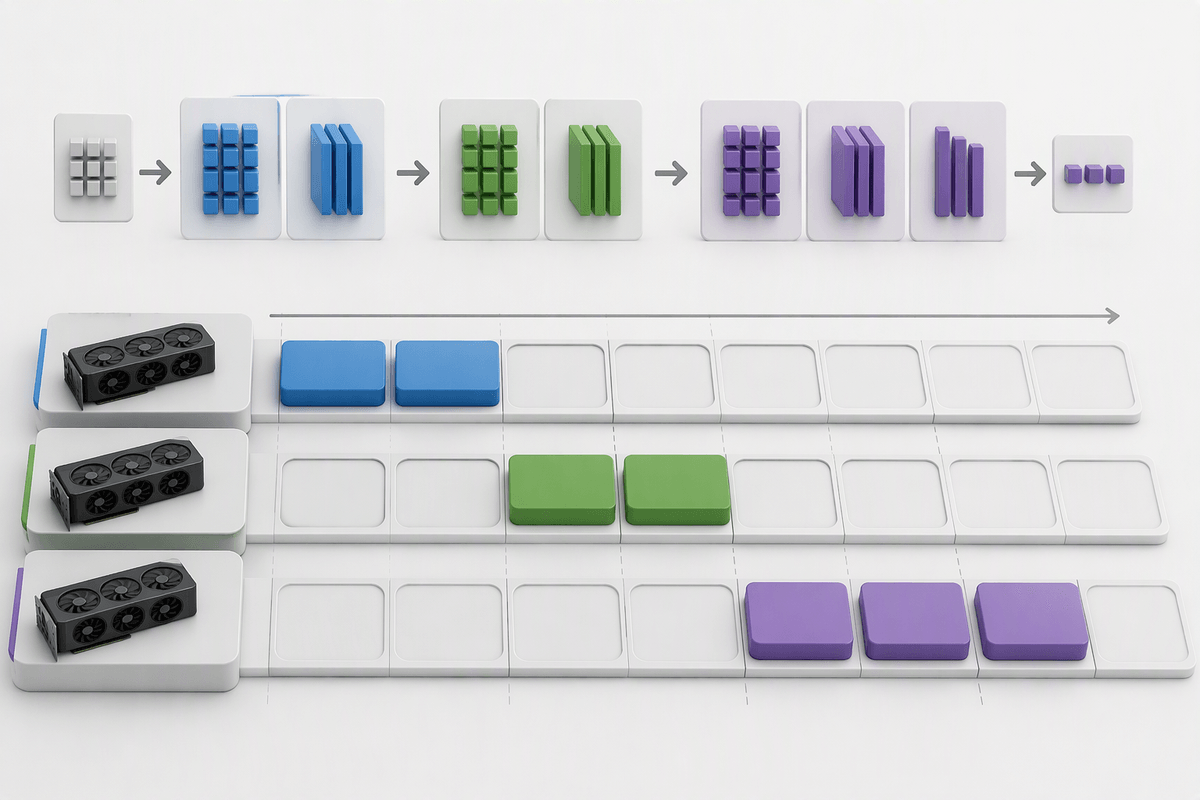
Adding a second GPU doesn’t automatically “double your usable VRAM” for a single model instance. Some things can be sharded (weights via tensor parallelism, or layers via pipeline parallelism), but other things often replicate: runtime buffers, parts of the KV cache depending on the engine, and sometimes an entire copy of embeddings or output heads. If you run data parallel replicas to increase throughput, you’re explicitly duplicating weights and KV cache per replica, so total capacity goes up, but per-request capacity usually does not.
The interconnect becomes a first-class constraint. Tensor parallelism introduces frequent cross-GPU communication on every token step, so PCIe-only setups can add latency and create jitter under load, while NVLink-class bandwidth helps but still isn’t free. Pipeline parallelism reduces per-step communication but adds “bubble” inefficiency and makes small batches underutilize GPUs. Operationally, multi-GPU also widens the surface area for OOM: one shard hitting a workspace spike can take down the whole request, and debugging memory becomes “which GPU filled up first?” rather than “did I fit?”
Memory-driven knobs: context, batching, and concurrency
A familiar surprise is that “max context” is not a cosmetic product setting; it’s a memory contract. Every extra token you allow increases KV cache residency for the entire duration of the request, and that memory is multiplied by how many sequences you process at once. If you move from a 4k to a 16k context window, you often don’t just pay 4× more in cache—you also reduce how much batching or overlap you can afford before you hit the ceiling. It’s why a model that feels fine in a notebook can become fragile the moment you turn on long-document mode.
Batching and concurrency are the other two knobs that quietly compound. Batching improves throughput by amortizing kernel launches and increasing GPU utilization, but it inflates activations and temporary workspaces, and it can force you to hold more KV cache simultaneously. Concurrency increases utilization too, but it’s basically “multiple KV caches alive at once,” which can be worse than batching for peak VRAM. A practical operating rule is to pick one primary throughput lever (batching or concurrency), cap the other, and leave 10–20% VRAM headroom for allocator fragmentation and workspace spikes—otherwise you buy throughput with instability and tail-latency jitter.
A deployment checklist to avoid VRAM surprises
The deployment moment that bites teams is when “it runs once” becomes “it serves continuously.” Before you commit hardware, measure peak VRAM with production-like inputs: worst-case prompt length, max_new_tokens, your real sampling settings, and the concurrency you expect at p95 traffic. Record a full breakdown: weight precision/quant format, KV cache per request, batch size, and any engine workspaces that spike on first run or during warmup.
Then set hard limits: cap context and max_new_tokens, enforce admission control for in-flight requests, and reserve 10–20% headroom for fragmentation and transient buffers. Finally, test failure modes on purpose—load spikes, model reloads, and rolling deploys—because those are the moments when an allocator that “usually fits” turns into an OOM page at 2 a.m.