Why faster support now needs AI help
Customers still judge support on the basics: how fast you reply, whether the first answer helps, and how many times they have to repeat the story. At the same time, case volume and channel mix keep expanding, and the “simple” questions are increasingly handled by self-service or chat—leaving agents with messier, higher-context work. That creates a squeeze: leaders want shorter response times, but agents spend more minutes per case just reading long threads, searching knowledge, and documenting outcomes.
AI help matters here because it targets the time sinks that don’t require human judgment every time: classifying intent, routing to the right queue, summarizing what happened so far, and drafting responses grounded in approved knowledge. The trade-off is real work up front—cleaner data, governance for what the model can use, and process changes so automation doesn’t simply accelerate mistakes.
Where your cases slow down today
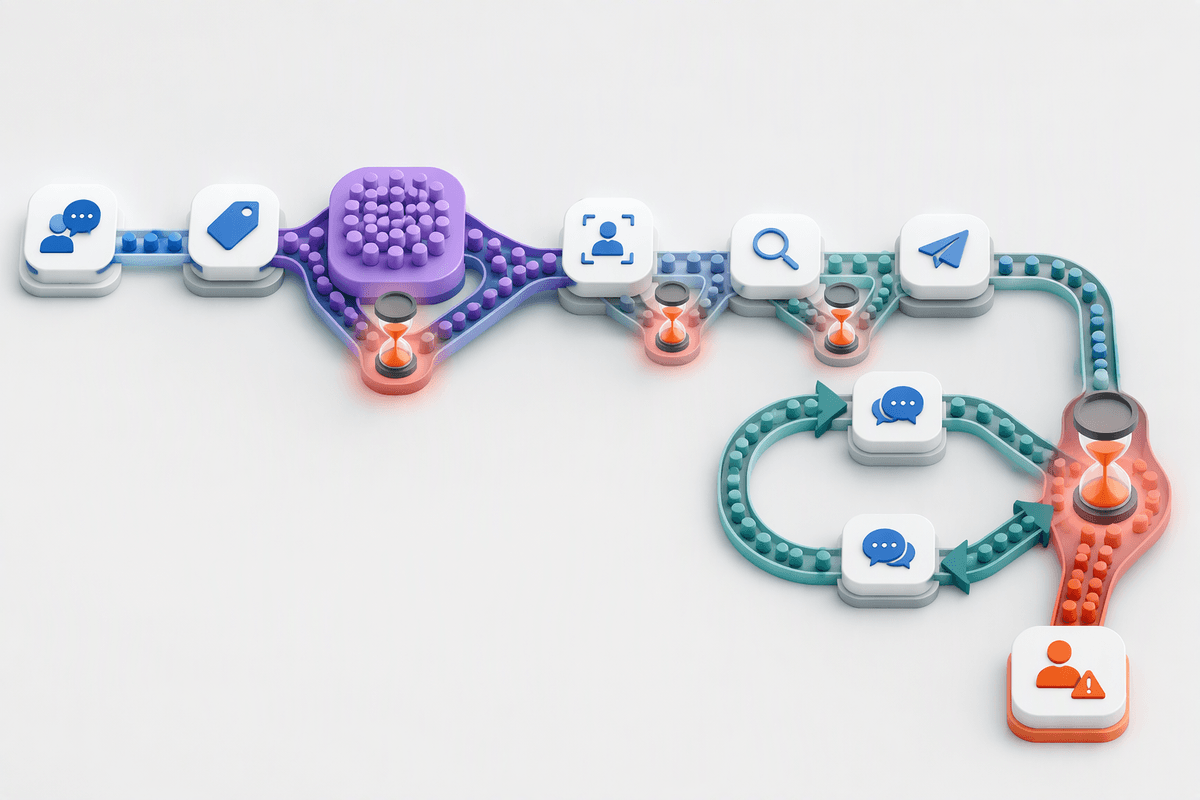
A typical delay doesn’t come from one big failure. It comes from small handoffs: a case arrives with a vague subject, gets tagged inconsistently, lands in a general queue, then waits for someone to read a long history and decide who actually owns it. Even when routing is “correct,” the agent often starts by reconstructing context across emails, chats, and internal notes, then hunting for a similar past resolution or the right knowledge article. Minutes disappear before the first useful sentence goes to the customer.
After that first reply, cycles repeat. Customers add new details in follow-ups, agents re-ask questions because intake fields were incomplete, and internal escalation adds more time because the summary isn’t crisp enough for the next team to act. The bottleneck is rarely typing; it’s understanding and coordination. Fixing this manually usually means stricter forms, more mandatory fields, and more QA—improvements that can raise effort and slow adoption unless the tooling reduces work at the same time.
Which Oracle AI tools map to support tasks
In day-to-day support, the useful question isn’t “Does Oracle have AI?” but “Which steps in my case flow does it actually touch?” Oracle’s service stack typically breaks into a few practical capabilities: natural-language classification to infer intent and product/topic, prediction and recommendation to suggest routing, priority, or next-best actions, and generative assistance to summarize threads and draft replies or internal notes. On the knowledge side, AI features can help find the right article faster, propose new articles from resolved cases, and improve consistency by steering agents toward approved content rather than ad-hoc answers.
The mapping is straightforward: intake and queue management benefit most from classification and routing recommendations; agent efficiency benefits most from summarization and response drafting; lifecycle hygiene benefits from suggested fields, follow-up questions, and resolution capture. These features rely on clean historical case data, stable taxonomies, and well-governed knowledge. They also add integration and compliance work if you need to limit what customer data is used, where it’s processed, and how outputs are audited.
Automate intake: classify, route, and prioritize

Think about what happens in the first five minutes of a new case: someone decodes a vague subject line, guesses the right product and issue type, and decides whether it’s urgent or just noisy. Oracle’s AI-driven classification and routing features are designed to compress that step by turning the customer’s own words into consistent tags, suggested queues, and an initial priority recommendation. When it works, you reduce “wrong-queue dwell time,” avoid unnecessary re-triage, and get to a first useful response faster—without forcing customers through longer forms.
The practical win is not only speed but consistency. A model can apply the same taxonomy rules across email, chat, and portal submissions, and can propose missing fields or a short set of clarifying questions so agents don’t restart discovery later. You need a stable category model, enough historical cases with reliable labels, and a plan for exceptions (new products, edge cases, and angry-but-low-severity messages). Expect tuning time, plus governance so priority automation doesn’t override SLA policy or create quiet bias toward “loud” customers.
Make agents faster with AI assist
In many teams, the biggest drag on handle time is the “rebuild the story” step: opening the case, scanning a long thread, checking past contacts, then turning that into a clean internal note before doing any real troubleshooting. Oracle’s AI assist features aim to compress that setup work by generating a short case summary, pulling out key entities (product, environment, error codes), and proposing the next questions or actions an agent would typically take. When the suggestions are grounded in your approved knowledge, agents spend less time searching and more time confirming the right fix.
Response drafting is where gains are visible but easy to overestimate. A suggested reply can accelerate first response and improve consistency, yet agents still need to verify accuracy, tone, and policy language—especially for billing, refunds, or regulated data. The practical constraints show up quickly: messy knowledge articles produce messy drafts, and privacy rules may limit what content can be used for generation. Plan for enablement time, updated QA checklists, and clear guidance on when agents must override AI output rather than “edit and send.”
Streamline case lifecycles with smarter workflows
Once the first response is out, the slowdowns tend to move into follow-ups and internal handoffs: waiting for a customer to provide a missing detail, bouncing between Tier 1 and a specialist, or reopening cases because the resolution notes were thin. Smarter workflows help most when they reduce “coordination tax.” In Oracle Service, that typically looks like using AI recommendations to prompt the right next step (request specific missing fields, suggest an escalation path, propose a related knowledge article) and using generated summaries to keep context intact as ownership changes. The goal is fewer cycles where a new person rereads the full thread just to decide what to do.
If your routing rules, SLAs, and disposition codes aren’t consistent, AI-driven guidance can amplify inconsistency faster. Plan for workflow guardrails: human approval for high-impact transitions (refunds, breach notifications), required rationale fields on escalations, and clear auditing of when AI suggestions were accepted or overridden. Expect some upfront effort to simplify statuses and templates so automation doesn’t just accelerate clutter.
Pilot, measure, and scale without surprises
A pilot works best when it targets one measurable choke point—new-case triage in a single channel, or summary-plus-draft for one product line—rather than “AI everywhere.” Set a short baseline first (first response time, reassignments per case, average handle time, reopen rate, and QA defect rate), then run the pilot long enough to cover real variability like peak days and escalations. Keep a human-in-the-loop rule for high-impact outcomes, and log when agents accept, edit, or ignore suggestions so you can separate “tool available” from “tool used.”
Scaling usually fails on unglamorous details: inconsistent labels, knowledge gaps, and training time. Budget for taxonomy cleanup, knowledge curation, and a feedback loop where misrouted cases and bad drafts become retraining and rule updates—not one-off complaints. Roll out by queue and risk level, publish clear guardrails (what data can be used, what must be verified), and treat governance as an operational process with owners, not a one-time setup.