Why this difference matters in practice
You’ve seen the same chatbot look brilliant in one moment and unreliable in the next. A customer asks, “What’s our refund policy for enterprise?” and gets a crisp answer that matches your docs. Then someone asks, “What did we change in last week’s release?” and gets something plausible that nobody can find. The difference often isn’t the model “trying harder.” It’s whether the response was pulled from your actual sources or generated from learned patterns.
That choice shows up in day-to-day product outcomes: whether you can provide citations, whether answers stay current as policies change, and whether you can explain mistakes. It also affects latency and cost, since fetching documents and reranking adds work. If you don’t separate these modes, teams end up debating “prompt quality” when the real issue is system design and what the answer is allowed to be based on.
Retrieval: the answer comes from your sources

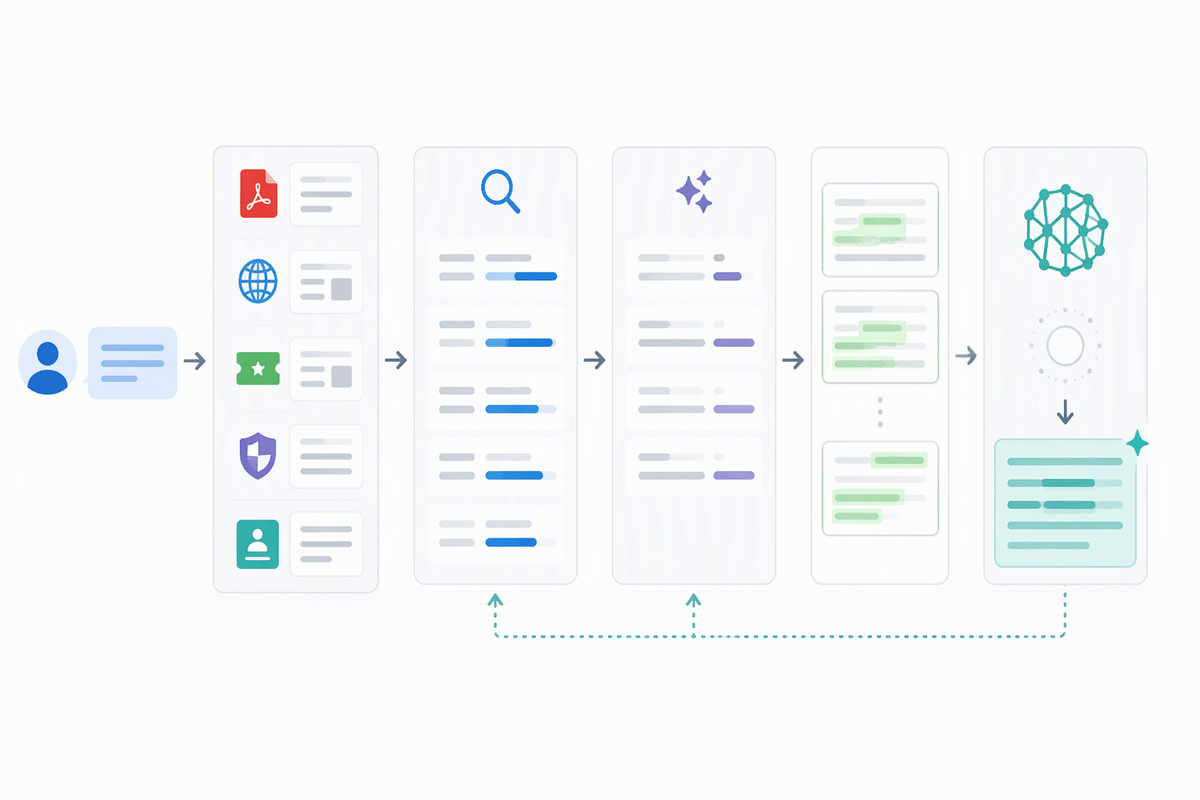
Think about the last time you looked something up at work: you didn’t want a “good guess,” you wanted the paragraph in the handbook, the exact pricing table, or the line item in a release note. Retrieval works the same way. The system takes the user’s question, searches across approved material (tickets, PDFs, wiki pages, policies, CRM notes), and brings back a small set of passages that are likely to contain the answer. The model’s job shifts from inventing content to reading, selecting, and stitching together what was actually found.
This is why retrieval can support citations, audits, and quick updates when a policy changes. It also creates practical constraints. If your sources are missing, stale, poorly chunked, or locked behind permissions the system can’t enforce, retrieval won’t magically fix it. It can also add latency and cost, since search, reranking, and longer prompts are extra steps you pay for on every query.
Model-generated answers: the answer comes from patterns
Picture the same refund-policy question, but this time the system doesn’t search anything. The model still answers because it has seen millions of similar questions and phrasings during training, and it can predict what a “typical” policy sounds like. That’s useful for general explanations, drafting emails, brainstorming edge cases, or translating a requirement into clearer language. It’s less reliable for facts that are specific to your company, your latest release, or your current pricing tiers, because the model isn’t reading your internal truth in that moment.
In this mode, correctness depends on whether the needed detail is common, stable, and well represented in the model’s learned patterns. Freshness is a real constraint: if something changed yesterday, the model won’t “know” unless you put the update in the prompt or connect retrieval. You also lose easy traceability. The answer may be coherent and confident, but there may be no document you can point to, which makes reviews, audits, and customer escalations harder.
A quick mental test: can you cite it?
Try a simple mental test while reading any assistant response: could you cite where each key claim came from? Not “somewhere in Confluence,” but a specific page, section, ticket, or policy clause that a reviewer could open and verify. If the answer includes dates, version numbers, pricing, eligibility rules, or “we changed X last week,” it should be straightforward to point to an authoritative source. If you can’t, you’re likely looking at a model-generated guess, even if it sounds polished.
This test also reveals mixed answers. A response might correctly explain a general concept, then quietly slide into specifics (“your enterprise refunds allow…”) without any backing. The practical catch is that citation-ready systems cost more to build and run: you need maintained documentation, stable IDs, access control, and enough retrieval quality that the model isn’t forced to improvise when sources are thin.
Failure modes: missing docs vs confident nonsense
A familiar failure with retrieval is the “empty shelf” problem. The user asks something real and specific, the system searches, and the right document simply isn’t there—or it exists, but it’s outdated, misnamed, split across multiple pages, or blocked by permissions. Good retrieval systems often fail in a way that looks unhelpful but honest: “I can’t find an authoritative policy for this,” or they return citations that don’t actually contain the claimed detail. The cost is friction. Users have to refine queries, teams have to fix content hygiene, and you may need extra indexing work, chunking tweaks, or metadata just to make the obvious page show up.
The failure mode for pure model-generation is different: it fills the gap with something that sounds like it belongs. That “confident nonsense” can be worse than no answer because it passes casual review and only breaks when a customer, auditor, or engineer tries to act on it. It’s especially risky with numbers, dates, versioned behavior, and policy edge cases, where a plausible default is still wrong. The practical safeguard is to force a choice: either ground the claim in retrieved text or clearly label it as an unverified best-effort draft.
Choosing an approach for your product or team

You can usually tell which approach you need by watching what users do after they get an answer. If the next step is “take action in a system” (issue a refund, change access, quote pricing, commit to a ship date), treat it as a knowledge problem and bias toward retrieval with citations. If the next step is “think better” (draft a response, explore options, clarify requirements, summarize a meeting), model-generated output is often the faster, cheaper default because usefulness doesn’t depend on one exact paragraph being up to date.
Many teams land on a hybrid: default to retrieval for company-specific questions, and fall back to model-generation only when the system can’t find relevant sources. The hard part is making the fallback explicit. Without guardrails, users read a non-cited answer as policy. A practical pattern is to require citations for certain claim types (numbers, eligibility rules, “as of” dates, release changes) and otherwise refuse or switch into “draft mode.”
Budget and operations matter too. Retrieval adds latency, token usage, indexing work, and ongoing content hygiene. If your docs are messy or permissioning is complex, it can cost more to make retrieval trustworthy than to keep the assistant in non-authoritative “copilot” territory.
Putting it together: a simple decision checklist
A useful checklist is to start with the decision the user will make next. If the answer will trigger an external action, require retrieval, citations, and a visible “as of” timestamp; if you can’t retrieve, refuse or route to a human. If it’s for drafting, explanation, or ideation, allow model-generation but label it as non-authoritative. Treat any numbers, dates, pricing, eligibility rules, or release details as “citation required,” even in hybrid mode. Budget for the operational cost: indexing, access control, chunking, and doc hygiene, plus the latency users will feel on every grounded query.