Real-time translation sounds magical—until it’s live
You try a real-time translator in a quiet demo and it feels like a superpower: clean sentences, confident voice, and the illusion that language is no longer a barrier. Then you use it in a live moment—ordering food with background noise, joining a fast-moving video call, or handling a tense customer complaint—and the cracks show. People interrupt each other, jokes arrive late, and “close enough” wording shifts the meaning just enough to matter. The most surprising part is how quickly small errors change trust: once someone doubts a translation, every line after it gets second-guessed.
Latency vs accuracy: the first unavoidable compromise
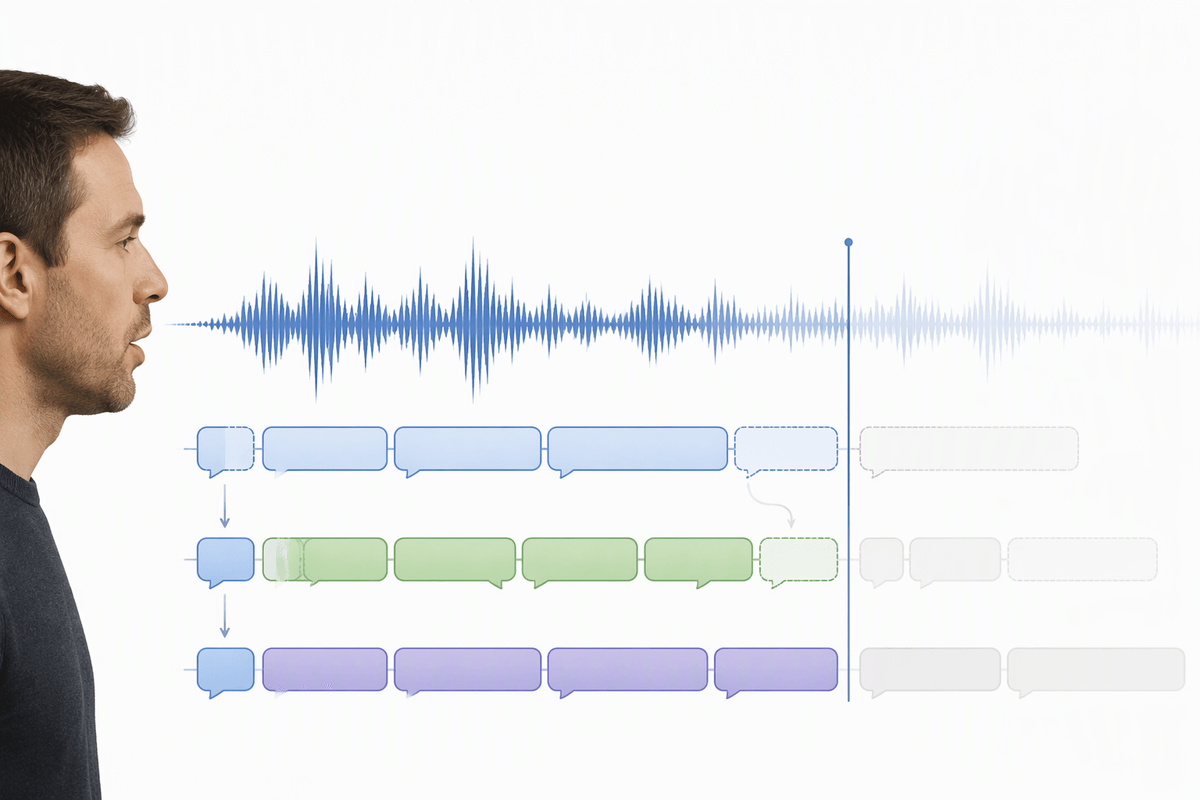
In live translation, the system has to decide when to speak. Wait for a complete thought and you usually get cleaner grammar, fewer pronoun mistakes, and better word choice. Start talking earlier and you feel “instant,” but the output is built on partial context, so it guesses—and then has to revise as the rest of the sentence arrives. That’s why you hear awkward restarts, dropped negations, or a confident first draft that quietly flips the intent.
This trade-off shows up most in languages where the key meaning lands late, or when someone backtracks mid-sentence (“Actually, don’t ship it—hold it”). If your tool is tuned for low latency, it may commit too soon and you’ll spend the conversation correcting it. If it’s tuned for accuracy, the delay can make people talk over the translation, which creates a second problem: the model now has overlapping audio and less clean input. Sometimes the practical fix is unglamorous—slower turn-taking, shorter sentences, and a habit of confirming critical details out loud.
When “real-time” changes what people say
You can see people adapt within minutes. A traveler starts speaking like they’re leaving a voicemail: slower, louder, and oddly formal. A teammate avoids humor, softeners, and side comments because they’re afraid the translator will turn “We might want to reconsider” into a flat “We will not do it.” In customer support, agents shift to rigid scripts and yes/no questions because open-ended language produces messy, hard-to-verify output. The tool isn’t just translating; it’s shaping the conversation’s pace, tone, and willingness to improvise.
That behavioral change has a cost. People stop using the signals that create trust—warmth, hedging, and small clarifications—and the exchange can feel blunt even when everyone is trying to be polite. It also pushes complex topics into unnatural phrasing that can introduce new ambiguity. A workable pattern is to keep “real-time” for momentum, then slow down for decisions: repeat names, numbers, dates, and commitments in a simple confirmation line before anyone acts.
Dialects, names, and jargon: where errors get expensive
You notice the biggest misses aren’t fancy sentences; they’re the small, specific tokens that carry consequences. A regional dialect word gets mapped to the “standard” equivalent and changes the social tone. A surname is heard as a common noun. A medication name becomes a similar-sounding drug. Even when the translation is fluent, a single wrong proper noun can send a shipment to the wrong city or put the wrong person in a meeting invite. These errors feel random because they depend on accent, mic quality, and whether the term is common enough to have strong training signal.
Jargon amplifies the risk because the model tries to be helpful when it’s uncertain. In a support call, “cache” might become “money box.” In a factory, a part code might be “normalized” into a word that looks right but isn’t a part. Fixing this often costs time: you need a custom glossary, a short pre-brief (“these are the product names”), or a slower workflow where critical terms are typed, spelled, or confirmed twice before anyone acts.
Privacy, retention, and compliance aren’t add-ons

The moment you use real-time translation for something sensitive, the hard question isn’t “Does it work?” but “Where does the audio and text go?” Many tools stream speech to the cloud, create transcripts, and keep logs for debugging or quality. That can be fine for travel small talk, but it’s a different category when a support call includes account numbers, when a sales demo reveals roadmap details, or when a HR conversation includes medical or immigration context. If the tool is capturing both sides of a call, you may also need explicit consent, not just a quiet assumption that “everyone knows it’s being translated.”
Compliance is rarely a toggle you add later. You need clarity on retention windows, who can access transcripts, whether data is used to improve models, and how deletion requests work. On-device options reduce exposure, but they often cost more, run slower, and may lag in accuracy or language coverage.
Cost and reliability: the bill and the failure modes
You feel the cost when “just try it” becomes a habit. Real-time translation is often metered by minutes of audio, simultaneous speakers, and extra features like diarization or live captions. A weekly team call can quietly turn into a recurring line item, and customer support adds a second multiplier: peak-hour concurrency. On-device setups shift the bill from usage fees to hardware, deployment work, and updates, and you may still need a cloud fallback for less common languages.
Reliability fails in predictable ways that look random in the moment: Wi‑Fi drops, Bluetooth mics desync, background noise spikes, and the tool latches onto the wrong speaker. Some systems degrade gracefully, others collapse into silence or confident nonsense. The practical move is to plan for a “translation outage” like any other: a typed backup channel, a protocol for confirming numbers and names, and a clear rule for when to pause and escalate to a human.
Choosing the right approach for your situation
The choice usually comes down to what failure would cost you. For travel and informal chats, speed matters more than perfect register, so a low-latency mode is fine if you’re willing to rephrase and confirm. For remote teamwork, aim for “mostly real-time” plus a written recap: let the tool keep momentum, but lock decisions in text with names, dates, and owners. For customer support, treat translation like a safety layer, not an autopilot—use glossaries, scripted confirmations, and an escalation path to a human for billing, medical, legal, or anything irreversible. Every safeguard slows the conversation, but it prevents expensive cleanup later.